Reverse Proxy Overview
Reverse proxies provide a method to be able to host multiple websites or multiple web services utilizing a single IP address.
In order to function properly, reverse proxies need coordination with an External Domain Name Service (such as Google, OpenDNS, Cloudflare) and with a Local Domain Name Server which will resolve LAN server host names to LAN IP addresses.
If a reverse proxy proxies for multiple domains/subdomains that are accessible external to the LAN, each domain name should be registered with a DNS provider which provides a domain name –> WAN IP address mapping. In the scenario where one reverse proxy is utilized,, the domains/subdomains will map to the same WAN IP address. In configuring DNS records at your DNS provider, subdomains are usually entered as CNAME records and TLD (Top Level Domains) are usually entered as A records. Records must be configured properly so the domains resolve to the WAN IP address of the Reverse Proxy.
The reverse proxy’s function is to “distribute” all incoming requests to the appropriate backend service/server associated with a particular domain name. The reverse proxy listens for connections on specfic network interface and ports, analyses network headers, and then fowards requests to the appropriate backend server or application.
This documentation will utilize Nginx as the reverse proxy implementation. When utilizing Nginx each domain associated with the reverse proxy is known as a virtual host. Each nginx virtual host has it’s own separate configuration paramaters. The setup instructions in this guide create a separate configuration file for each of nginx’s virtual host.
Reverse Proxy and SSL Management
In addition to forwarding connections to the appropriate backend server, a reverse proxy may also provide SSL capabilities for transport layer encryption/decryption. Reverse proxies may function as a
- SSL terminating proxy
- SSL Pass-through proxy
- SSL terminating and Re-Encryption Proxy where connections are decrypted at the reverse proxy and then re-encrypted to the backend server.
SSL terminating proxies are probably the most common type of reverse proxy. These proxies will offload the SSL encrypted connection and pass the connection unencrypted to the backend server usually residing on the same LAN or a (V)LAN where the risk of traffic snooping is very low. Many applications are designed purposely to work in concert with a front-end reverse proxy so the reverse proxy will handle all the transport layer encryption and de-encryption. SSL terminating proxies also make SSL certificate management easier, since the SSL certificates for all the virtual domains hosted by the reverse proxy can be kept in one location.
SSL pass-through proxies are reverse proxies which do NO SSL Offloading and pass the encrypted connection directly to the backend. The backend system is responsible for SSL offloading and for SSL certificate management.
SSL terminating and Re-encryption Proxies are a combination of the two methods. The reverse proxy will terminate the original encrypted connection and then re-encrypt with a different certificate. In many cases, systems may use a combination of SSL certificates obtained from an established certificate agency (Let’s Encrypt, Verisign), and self-sign SSL certificates for the internal backend connections. Nginx refers to this re-encryption as encryption to “Upstream Servers”
This guide will discuss the implementation of an SSL terminating and SSL terminating/re-encrypting proxy.
LAN Name-Based Server to LAN IP Address Mapping
Nginx can proxy to name-based servers. The following is an excerpt
Similar to external DNS providers which provide mapping of domain names to WAN IP addresses, there must also be a mapping of named-based LAN server to LAN IP addresses for reverse proxies to correctly function. LAN servers may either be identified directly by IP Address or by Name. A reverse proxy such as nginx may proxy connections to backend servers based on local IP address or domain names. .
LAN Servers identified by IP address
A SSL offloading reverse proxy which forwards based on a LAN IP address is shown below:
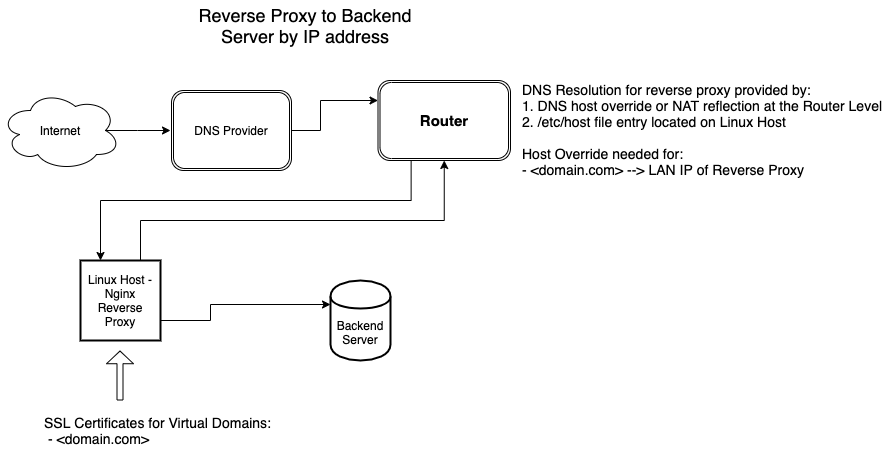
An example nginx configuration file for an nginx virtual domain the proxies to a specific LAN IP addrress is shown below:
  server { # simple reverse-proxy
    listen       80;
    server_name  domain2.com www.domain2.com;
    access_log   logs/domain2.access.log  main;

    # serve static files
    location ~ ^/(images|javascript|js|css|flash|media|static)/  {
      root    /var/www/virtual/big.server.com/htdocs;
      expires 30d;
    }

    # pass requests for dynamic content to rails/turbogears/zope, et al
    location / {
      proxy_pass      http://192.168.1.10:8080;
    }
  }
In the example above, nginx will forward the incoming connection to the backend server identified by 192.168.1.10.
LAN Servers Identified by Name
Similar to DNS providers, a locally implemented name-based identification scheme must create a mapping between the servers’ host names and their LAN IP addresses. The mapping of LAN IP addresses to LAN names can be accomplished at the “router level” or at the “host level”.
Host Level Mapping
“Host level” mappings are managed through making modifications to the host server’s /etc/hosts file. An example /etc/hosts file is shown below:
192.168.56.1   ubuntu.tecmint.lan
192.168.56.10  centos.tecmint.la
The /etc/hosts file is a one to one mapping of LAN IP addresses to LAN host names. In the instance of when docker container virtualization is utilized on the host machine, the host’s/etc/hosts file will be shared with the docker network. The use of /etc/hosts files may be problematic particularly if there are multiple servers within the LAN. Each server maintains it’s own /etc/hosts file. Synchronizing /etc/hosts files between hosts may be difficult given a large network.
Router Level Mapping
“Router level” host name mapping is done by the network router. This scheme may be advantageous since the (host name)–(LAN IP address) mapping occurs at one location. Depending on the type of router, each router may be configured to either use NAT reflection or Host Overrides to peform this mapping..
Host Override configuration is very similar to configuring /etc/hosts:
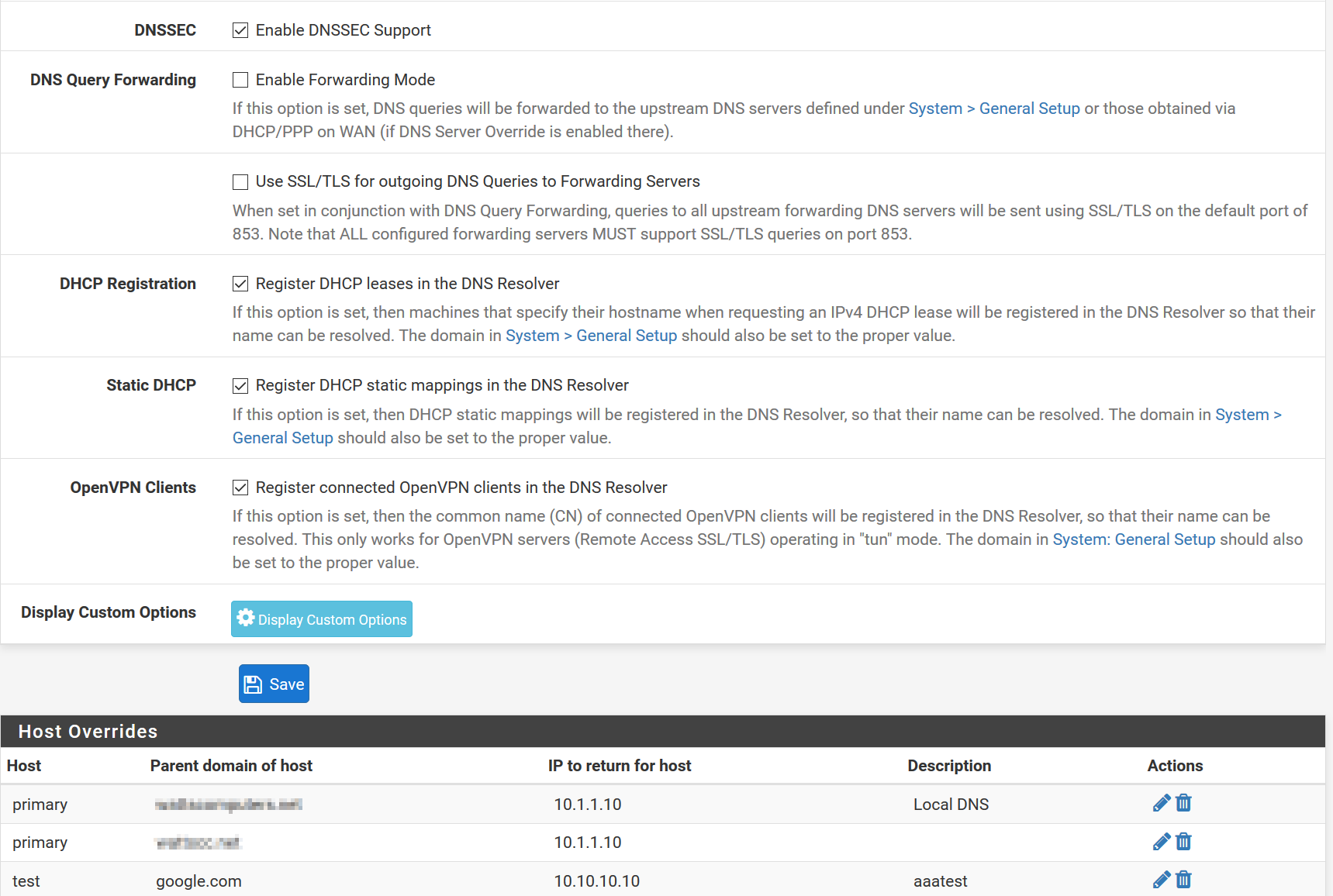
When implementing a “Router Level” hostname mapping scheme, I usually:
- Make a Host Override entry for each server running on the LAN
- Make a Host Override entry for each virtual domain referenced in the reverse proxy setttings
Nginx can reverse proxy according the host name as long as a correct Local Host Name–>LAN IP Address has been appropriately configured. Below is an an excerpt from a virtual host block that demonstrates proxying by name:
    location / {
      proxy_pass      http://backend.domain.com:8080;
    }
Docker and Name-Based <–> IP address Mapping
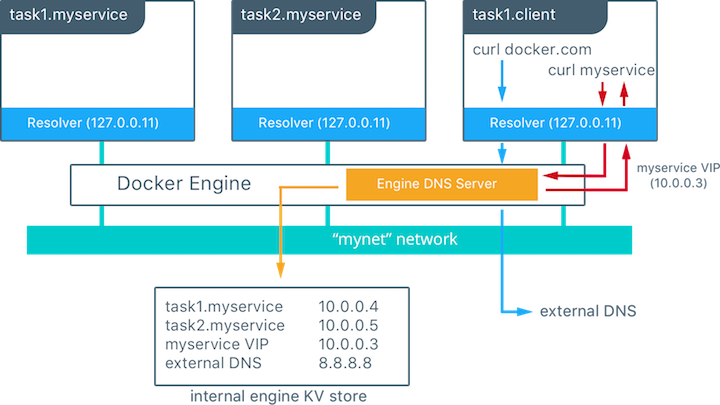
Docker creates create containers from docker images. Usually one image runs inside each docker containers. Docker creates a “Docker Local Area Network” with an embedded docker DNS server. The address of the embedded DNS server by defaultis 127.0.0.11. If containers are started with names, docker containers can communicate with each other by docker-container name rather than docker container IP address. The docker DNS server is also capable of resolving server names outside the docker network. It will receive a copy of the host’s /etc/hosts file upon initialization and it can also query local and external DNS server.
For this tutorial, I will be referencing setup similar to the diagram below:
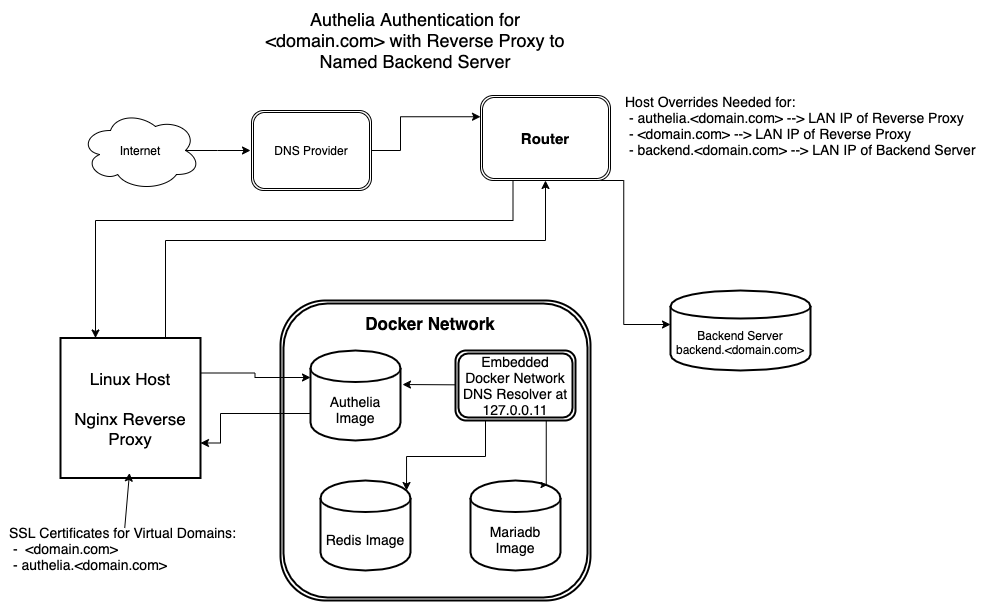
For simplicity, this guide operates according to the following parameters:
- The name of the domain requiring frontend authelia authentication is <domain.com>
- The frontend authelia registration portal is authelia.<domain.com>
- backend.<domain.com> is the name of the backend server where the connections will be forwarded after authentication. The actually backend server could represent a variety of applications – ie nextcloud, a docker container, bitwarden server, backend web server for sensitive information, etc.
- Ensure Host Overrides have been created at the “Router Level” or “Host Level” to map the host names of authelia.<domain.com>, <domain.com>, and backend.<domain.com> to their respective LAN IP addresses
- authelia.<domain.com> and <domain.com> should be mapped to the LAN IP address of the reverse proxy.
- backend.<domain.com> should be mapped to the LAN IP address of the backend server.
- If desiring to host domains that are internet accessible, please ensure:
- A/CNAME records exist for authelia.<domain.com> and <domain.com> registered at your DNS provider. The records should point to the WAN IP address of the reverse proxy.
- SSL certificates have been obtained for both authelia.<domain.com> and <domain.com>. These certificates should be installed on the linux reverse proxy host within the respective /etc/letsencrypt/authelia and /etc/letsencrypt/<domain.com> directories.1
-
Obtaining and utilizing SSL certificates are recommended even if hosting internal domains that are accessible only within the LAN as compared to external domains that are accessible to the entire internet. If using Let’s Encrypt certificates, I would consider registering these internal domain names with a DNS-challege-validation-compatible DNS provider that integrates with either certbot or acme. Using DNS-challenge-validation greatly simplifies the SSL certificate renewal process. DNS-challenge-validation can be utilized even for domain certificates that are intended only to be used internally. ↩