
Authelia is an open-source applicationthat provides 2-factor authentication and single sign-on (SSO) for web based applications.
Authelia is a Docker-based application that sits between a reverse proxy and a web application. Authelia provides “frontend” authentication for the “backend” web application/service.
The authentication scheme(s) which can be utilized are a username/password and optionally coupled with a two-factor mechanism – Google Authenticator, Duo Push Notifications, or YubiKey.


The purpose of this document is to explain how to setup and implement an Authelia portal for a backend application.
Initial Requirements
It is assumed there is an existing framework in place in which the backend application is currently accessible behind a reverse proxy. This framework would appear similar to:
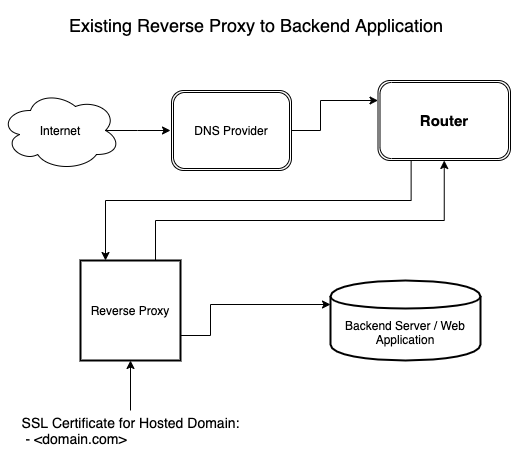
Instructions on how to configure a reverse proxy for your web application to fulfill the initial requirements are discussed in here.1
Although not an absolute requirement, it is recommended SSL certificates are utilized for the hosted domain.
Completed Setup
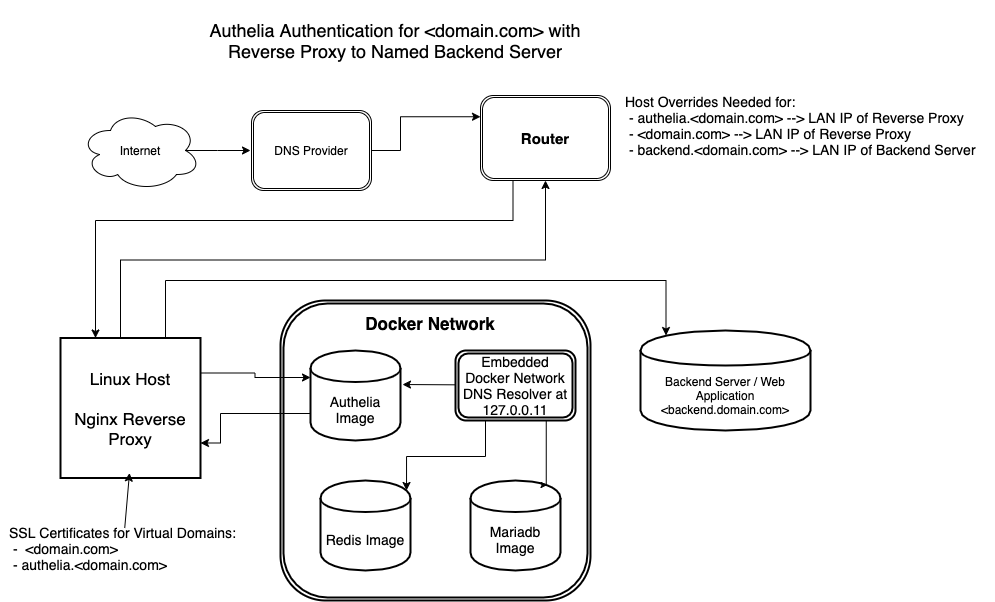
After completing the steps in this guide, the framework should appear similar to:
Guide Parameters and Limitations
This guide will:
- Discuss the Authelia Application
- Configure a linux based Nginx Reverse Proxy in order to use Authelia for frontend authentication
- Configure a Docker Setup consisting of authelia, redis and mariadb images as required by Authelia
- Discuss the concept of DNS Host Overrides and discuss setting up DNS Host Overrides at the Host or Router Level so host name resolution will work for the configured setup.
This guide will not cover:
- Router level port forwarding
- Firewall configuration either at the Router or Host Level.
Given the initial starting point, I am assuming the end-user has configured router level port forwarding and router/host firewall in order to allow access to the hosted web application without the frontend Authelia authentication scheme.
Compatibility
This guide should be applicable with slight modifications to all systems capable of running docker containers.
This guide was constructed using the following reference system
Reference Files
All configuration files used in this guide may be found here
In configuring Authelia, at least 2 or more sites need to be configured within the reverse proxy:
 1. The Authelia Portal
 2. One or more Protected Sites or Protected Domains/Subdomains/Folders
The Authelia Portal
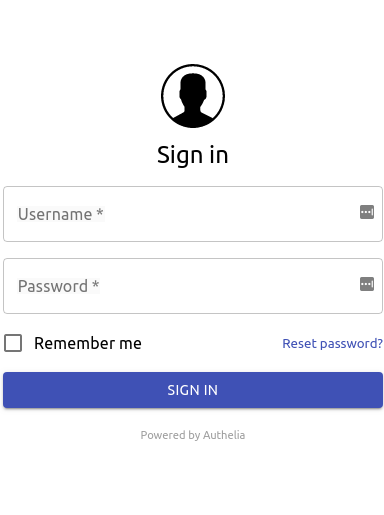
The Authelia Portal is a website where users will initially log in to register and activate the two factor authentication method. Users will login with a given username/password and then register with the Google Authenticator app or Duo Push app. Users are sent an email to confirm the registration during this process.
The Authelia Portal appears similar to:

Protected Site(s)
Once registered, users will have the ability to access specific Protected Sites or Domains using their registered authentications scheme. When a user attempts to access the URL of the protected site, the user will be redirected to the authelia portal. Users will need to authenticate with a username/password along with either a Google Authenticator Code, Duo Push Notification or YubiKey if two-factor authentication is configured for the Protected Site. Once authenticated within authelia, the user will be redirected to the Protected Site. Below shows two screenshots for authenticating with a Goggle Authenticator code and a Duo Push Notification.